









Thorfortune registration: how to create an account
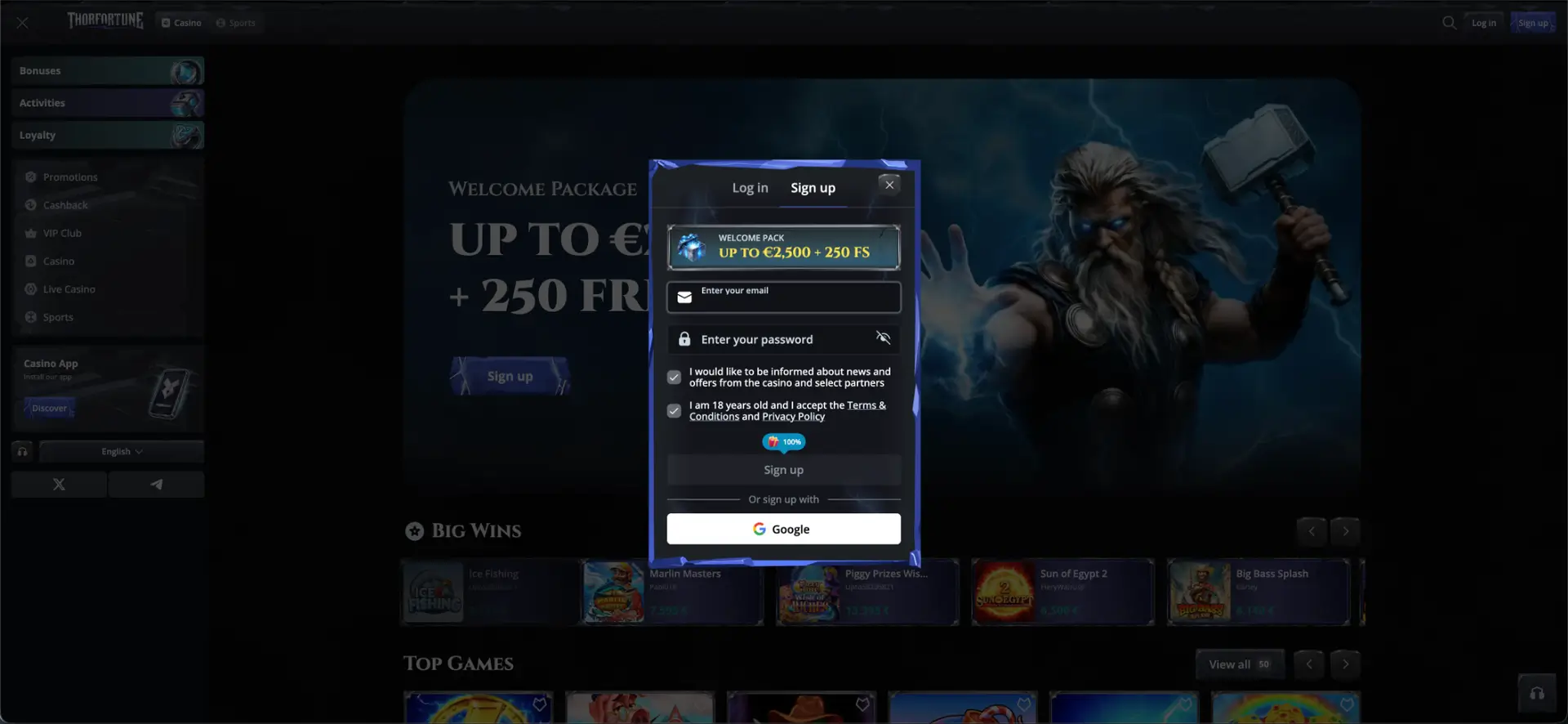
Thorfortune registration starts in a window containing an email field, password field, confirmation of legal age and acceptance of the terms, optional consent to communications and a Google sign-up button. The initial form is brief, but the account may request personal details and KYC verification before allowing certain operations.
Before registering, check whether Thorfortune accepts users from your location. Creating an account does not guarantee that deposits, bonuses or withdrawals are permitted from Great Britain, and an English interface or GBP option is not proof of a UK Gambling Commission licence.
Contents
The main details are summarised below.
| Detail or action | Visible information |
|---|---|
| Start | Sign up button in the top-right corner |
| Required field in the first step | |
| Password | Required field with a show or hide option |
| Marketing | Separate tick box for news and offers |
| Age and terms | Confirmation of age 18+ and acceptance of the terms and privacy policy |
| Alternative registration | Continue with Google |
| Displayed offer | Up to £2,500 + 250 free spins |
| KYC | May be requested before the first withdrawal |
Always check the current terms before making a decision.
Thorfortune registration step by step
The main details are summarised below.
- Open the website and check the domain.
- Select Sign up.
- Enter an email address that belongs to you and can be accessed.
- Create a unique password.
- Decide whether to receive marketing communications; this box should be optional.
- Confirm that you are at least 18 and accept the legal documents.
- Select Sign up or use Google.
- Complete any additional details requested in the account panel.
- Review the currency and promotion before depositing.
Always check the current terms before making a decision.
Registration with Google
The Google option reduces the need to enter credentials manually, but users must still accept the terms and meet the age and location requirements. Check which email address is active before continuing, especially when several Google accounts are open in the browser.
Choosing a password and protecting the account
The main details are summarised below.
- Use a password that is different from the email account password.
- Combine words, numbers and symbols without obvious personal information.
- Store it in a password manager.
- Do not share screenshots of the account panel or cashier.
- Enable additional security measures when available.
Always check the current terms before making a decision.
Details that may be requested later
Although the first form displays only email and password fields, the profile may require a legal name, date of birth, address, telephone number, country and currency. The details should match the documents used during KYC and the name of the payment method holder.
Thorfortune KYC verification
Information published by the platform indicates that the review may be triggered when the first withdrawal is requested. The documents mentioned are:
- A passport or driving licence as proof of identity.
- A recent bill or equivalent document as proof of address.
- Evidence of ownership of the card, wallet or account used.
The platform refers to a review taking up to 48 hours in its informational content, although the actual time depends on document quality and additional checks. Hide sensitive information that the form does not request and use only the upload channel inside the account.
Selecting a bonus during registration
The initial window displays the welcome package, but promotional codes are managed in the cashier. The main package does not appear to be linked to a code. Before the first deposit, open the rules and confirm whether you wish to activate the promotion or deposit without a bonus.
Common Thorfortune registration errors
Email already in use
Do not open a second account. Recover the password or contact support.
Password rejected
Check the length, required characters and spaces. Avoid copying a password that contains line breaks.
Registration blocked by location
This may indicate that the platform does not accept users from that territory. Do not use tools to hide your location.
The email does not arrive
Check spam and promotions folders and confirm that the address was entered correctly. Add the domain to safe senders only after verifying it.
Frequently asked questions about Thorfortune registration
What do I need to register?
An email address, a password, an age of at least 18 and acceptance of the legal documents.
Can I register with Google?
Yes. The form displays this option.
Is KYC required immediately?
Not always during the first step, but it may be required before a withdrawal or during security checks.
Can I have several accounts?
This is not recommended and is usually prohibited. Use access recovery when a profile already exists.
Does registration automatically activate the bonus?
Do not assume so. Confirm the selection and rules in the cashier before depositing.
Can I register from Great Britain?
Eligibility must be checked and any restriction respected. Verify the current terms, the operator and the exact domain on the UK Gambling Commission public register.